Best Podcast Editing Software for Podcasters of All Levels
My first podcast editing software was Adobe Audition. That was more than 16 years ago, and I still use it regularly today.
It might surprise you, but I also recommend Audition to almost no one. If you’re new to podcasting and looking for editing software, there are many better fits out there.
In this roundup, I’ll show you my three top picks, which cater to every need, use case, and budget.
- Audacity: popular and free software that looks good for its age
- Hindenburg Pro: elegant interface designed for spoken-word audio
- Alitu: podcast-specific tool with call recording, video editing, and publishing built in
Then I’ll run through a few other options you might want to check out, too.

Most Popular Podcast Editing Software
In the 2024 Podcast Gear, Software, & Setups Report, more than 500 podcasters told us which editing software they used.
- Audacity – 24%
- Adobe Audition – 16%
- Other – 14%
- Garageband – 9%
- Descript – 7.5%
- Alitu – 7%
- Hindenburg – 5%
- Reaper – 4%
- Logic – 3%
- Riverside – 2%
- Podcastle – 1%
- Pro Tools – 1%
Let’s take a closer look at Audacity, Hindenburg, and Alitu, because you’ll probably find what you need in one of those.
Audacity
Let’s start with the great-grandfather of podcast editing software: Audacity.
Almost a quarter of creators use it to produce their shows.

A huge pro of Audacity is that it’s free. It’s also a powerful, feature-rich platform once you learn your way around it.

Audacity for Podcast Production (& Why 1 in 4 Use It!)
Read article called: Audacity for Podcast Production (& Why 1 in 4 Use It!)But that learning curve can be steep if you’ve no prior experience with DAWs (Digital Audio Workstations). Audacity doesn’t have any video editing capabilities, either. So if you opt to run a video show, you’ll need to use dedicated video editing software.
- Cost: Free
- Recording Capabilities: Audio
- Video Editing: No
- Publishing Tools: No

If you’re brand new to podcasting, though, then it makes sense to focus purely on audio, at least until you find your feet. If you have no budget, then free is an excellent price point, too!
Hindenburg Pro
Hindenburg Pro is a pretty unique DAW because it’s designed specifically for spoken-word audio.

Other DAWs can seem cluttered when compared to Hindenburg’s elegant, minimalist interface. But that doesn’t mean it’s basic or limited podcast editing software. On the contrary, I know a few vastly experienced audio pros who swear by it.
- Cost: $12/month
- Recording Capabilities: Audio
- Video Editing: No
- Publishing Tools: No
Hindenburg’s notable features include automatic volume levelling, a drag-and-drop interview workflow, and voice profiling, which matches tone across clips.

Like Audacity, it doesn’t offer video editing tools. It also doesn’t have a default remote call recorder, but it can record audio from apps like Zoom, Google Meet, and Microsoft Teams.
Hindenburg Pro is a perfect option for someone who wants to really master the art of audio storytelling. It offers a brilliant balance of nuanced control without overwhelming options and clutter.
Alitu
Alitu was originally built to reinvent podcast editing from the ground up and make it accessible to complete beginners.

Today, it’s still best known as a brilliant podcast editing software platform. But Alitu has a suite of extra features that make it an all-in-one podcast maker tool.
Most notably, you can record remote audio or video calls in the Alitu dashboard. You can also use its hosting tools to publish and distribute your finished episodes to Apple Podcasts, Spotify, and the many other places podcasts are consumed.
- Cost: $38/month
- Recording Capabilities: Audio & Video, Solo or Remote Calls
- Video Editing: Yes
- Publishing Tools: Yes
These features mean you don’t need to pay for additional recording and hosting subscriptions elsewhere. But even if Alitu were only a podcast editor, it would still be a brilliant option for non-techy and time-strapped creators.

Video editing is the newest addition to Alitu’s stable of features. It follows the same intuitive workflow as its audio editor. You can even remove filler words at the touch of a button, and edit by deleting text in the automatically generated transcripts.
Noise reduction, volume levelling, and audio optimisation are strong features in Alitu, too. In the above sample, you’ll hear it remove a fire engine siren from an on-location outdoor recording.
And it can work wonders to bring you ‘on mic’ and kill reverb and room sounds, too. In the second sample, I recorded into my phone from the other side of the kitchen. Listen to Alitu’s repair job.
I wouldn’t recommend Alitu to someone who wanted intricate control over their productions. In-particular, this might be documentary or audio drama podcasts with layers of music and sound effects. In these situations, I’d opt for Audacity, Hindenburg, or Adobe Audition instead.
But if you’re brand new to podcasting, want all your tools in one place, and don’t want to spend ages learning how they all work, then Alitu is ideal.
More Podcast Editing Software Options
My top three recommendations cover every need, use case, and budget, but they’re by far the only podcast software options out there. Here are six other popular platforms and my thoughts on them.
Adobe Audition
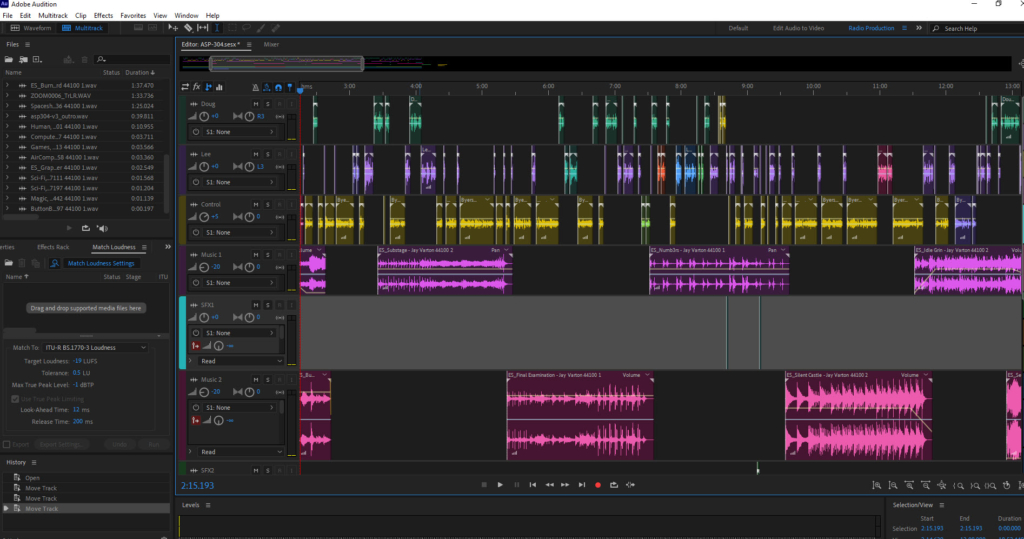
I’ve used Adobe Audition for years, but I rarely recommend it now. Adobe doesn’t seem to focus on it much anymore, and Audacity gives it a real run for its money for free.
Adobe Podcast
Adobe Podcast is one of the apps eating Audition’s lunch. It has a lot of useful tools, like transcription editing, audio enhancement, and you can record audio or video on the platform, too. At the time of writing, you’d still need an additional podcast hosting account to publish your show.
GarageBand
GarageBand is Apple’s classic DAW. You’ll find it on most iOS devices, so a lot of podcasters use it by default. If it’s working for you, then there’s no need to switch. But if you find it a wee bit limited, it could be worth trying Audacity.
Descript
Descript was the first platform I used for text-based editing, and they’ve always seemed ahead of the curve with their tools and tech. For example, their Overdub feature lets you type in new dialogue or fix mistakes using an AI clone of your voice. The only thing Descript lacks right now is publishing and distribution tools.
Reaper
Reaper is a DAW with a hardcore following. I don’t think it’s a great option for total beginners, though the ability to buy your licence outright rather than pay a subscription will appeal to some. Many of my podcast pals who swear by it moved over from Pro Tools and enjoy its customisation capabilities.
Riverside
When Riverside added hosting, they joined Alitu in the “all-in-one podcast maker” camp. Unlike Alitu, Riverside was a recorder first and editor second. But they’ve improved their editing tools a lot recently, and it’s a great platform to make your show with.
Podcast Editing Software FAQ
We’ve covered the main recommendations. But you might still have questions about podcast editing software before making a final decision. Let’s take a look at some frequently asked questions.
What Your Podcast Editing Software Can (And Can’t) Do
First up, why might you want to use podcast editing software in the first place? In what ways can it help you? And, depending on the platform, what sort of things are beyond its power?
Edits & Editing (Cutting Stuff Out)
People use podcast editing software for two main reasons. The obvious one is the editing out of mistakes and unwanted segments. This is literally where you cut out surplus content from the finished episode. For a deeper dive here, check out our ultimate guide to podcast editing.
Double up as Podcast Recording Software
Podcast editing software typically doubles up as podcast recording software. This is handy because it means you only need one single platform to record and edit your podcast. A select few, such as Alitu and Riverside, even have remote call recording capabilities and publishing built in.
Cleaning Up & Fixing Volume Levels
Another critical use of podcast editing software is a process known as “post-processing”. This is where you clean up any background noise, ensure that volume levels are consistent throughout, and that the overall volume of the episode is within generally accepted podcasting standards.
Audio Quality: Repair or Enhance
Your podcast editing software can be a powerful tool. But it isn’t magic. Nor is it a substitute for good practices in the recording process. If you hear a podcast with great audio quality, the main factors at play are that the podcaster has a decent level of gear, is using it in the right way, and has taken the recording environment into consideration. Be sure to get your house in order on these fronts, and everything else will fall into place.
Add in Music
Any podcast editing software you choose will enable you to add music to your content. The challenge here is sourcing which music you’ll use and steering clear of copyright infringement. For what it’s worth, if you decide to opt for Alitu, then you’ll have full access to its podcast music library.
Edit by Text
Text-based editing is where you select segments of a transcription and delete them, which deletes the corresponding section in your audio. A very small number of editing programs offer text-based editing at this stage, though it’s likely to become much more common in the next year or two. At the time of writing, you can edit by text with Alitu, Descript, and Riverside.
Background Noise
The cleaning up of “background noise” is a bit of an ambiguous term. Editing software can easily clean up consistent sounds like the hiss or hum underneath the vocals caused by things like equipment, fans, or AC units. However, background noise like people shouting, doors slamming, and phones ringing has traditionally been harder to remove. With that said, AI audio cleanup is repairing sound in a way that would’ve seemed impossible only a couple of years ago.
Podcast Production Software vs. Audio Editing Software
You can use any audio editing tools or software for your podcast, but dedicated podcast production software also exists nowadays.
For years, podcasters used equipment and software built, first and foremost, for music production.
As podcasting continues to grow, though, we’ve seen technology created specifically for the medium. Hardware-based examples of this are audio interface devices like the Zoom PodTrak P4 and Rode Rodecaster II.
Using pro-level software like Audition will give you tonnes of flexibility, including the ability to add and mix in all sorts of audio effects. But for most podcasters, this is overkill, and can add unnecessary complications.
Dedicated podcast editing software like Alitu, on the other hand, was tailor-made for podcasters. That means it has a suite of features for podcasters that stretch beyond the editing and production realm – from call recording to hosting and transcriptions built-in!
What About Video Podcast Editing Software?
Adding a video component to your show is undoubtedly easier than it used to be. Just like in the audio space, many makers of video production software are now focused on simplicity and accessibility rather than massive complexity.
Our dedicated roundup of the best video editing software for podcasters gives you the full lowdown. But here are the key takeaways.
Adobe Premiere and Final Cut Pro have the most power, flexibility, and options, which means they also have the steepest learning curve.
Filmora is a great option for those on a tight budget who want more simplicity and automation.
Veed excels if you’re doing shorter video content, whilst Camtasia is a top choice for those creating video podcasts out of screencasts.
There are also some fantastic video recording tools out there now who’s editing capabilities are improving all the time. Check out Streamyard, Riverside, and Zencastr for some options on that front!
Podcast Editing Software vs. Hiring a Podcast Editor?
You’ve really two options when it comes to editing podcasts – you can learn to do it yourself, or you can hire someone else to do it.
If you work with a dedicated podcast editor, you can pay them to turn your source files and audio tracks into fully mixed and mastered episodes.
An additional benefit, alongside not having to do this work yourself, is that you can get feedback from an actual qualified human. Your podcast editor might send you a note along the lines of “Please turn off those noise gates”, “Buy yourself a pop filter”, or “Stop recording in that cave”.
It’s in their interest that your source material sounds as good as possible because they can polish it up even better. If you record low-quality audio, on the other hand, no producer or production software will be able to make it sound decent.
Whilst getting that human feedback from a podcast editor is a big plus, there are downsides to outsourcing, too. It’s a lot more expensive, for starters. And you’re also now relying on someone else to get your show ready and out on time.
There’s no right or wrong approach here – only what works best for you and your budget. If you’re interested in hiring a podcast producer, then check out your range of options, linked there. Or, if you’re set on finding the best podcast editing software to do it yourself, hopefully, this guide has helped you choose one!
Publishing Content: Uploading Your Files
Regardless of which editing process or software you use, you’ll eventually need to upload your finished episode files and make them ready for the world to hear.
In order to turn audio files into a podcast that can be found and subscribed to on platforms like Apple and Spotify, you will need a podcast hosting account.
There are loads of great podcast hosting providers out there. Once you sign up for one, you fill out your show’s description, add your cover art, and upload your very first episode. Then, you can start submitting your podcast to all the major listening apps and platforms.
Recording and editing podcasts, as well as uploading and publishing them, can all happen in one single place now, too, with Alitu. It has hosting included, so you only need to work in one single place if you’re keen to save time, money, and, streamline your workflow.
But, as I’ve said, there are a lot of great podcast hosting options out there too, so check up our roundup if you’d like to do some shopping around.
Best Podcast Editing Software – Which Version?
As mentioned at the start, everyone is different, and it’s impossible to pick one single best podcast editing software option. It all depends on where you are at this moment in time in your podcasting journey.
There will always be exceptions, but on a general level, here’s a summary of my recommendations.

Looking to save time, avoid learning anything about audio editing, AND have access to a remote call recording, video and text-based editing, and hosting built into your editing software?
Looking for a free option, but are prepared to invest some time in learning audio editing?
Ultimately, your editing software is just a means to an end. The quality of your podcast will ultimately be decided by its content, and no editing software or DAW can guarantee you growing an audience.
That said, none should hold you back from growing one, either!
So choose something, learn it, and use it to the best of your ability. But don’t let it distract you too much from the work that matters most – creating engaging episodes that people want to listen to.